
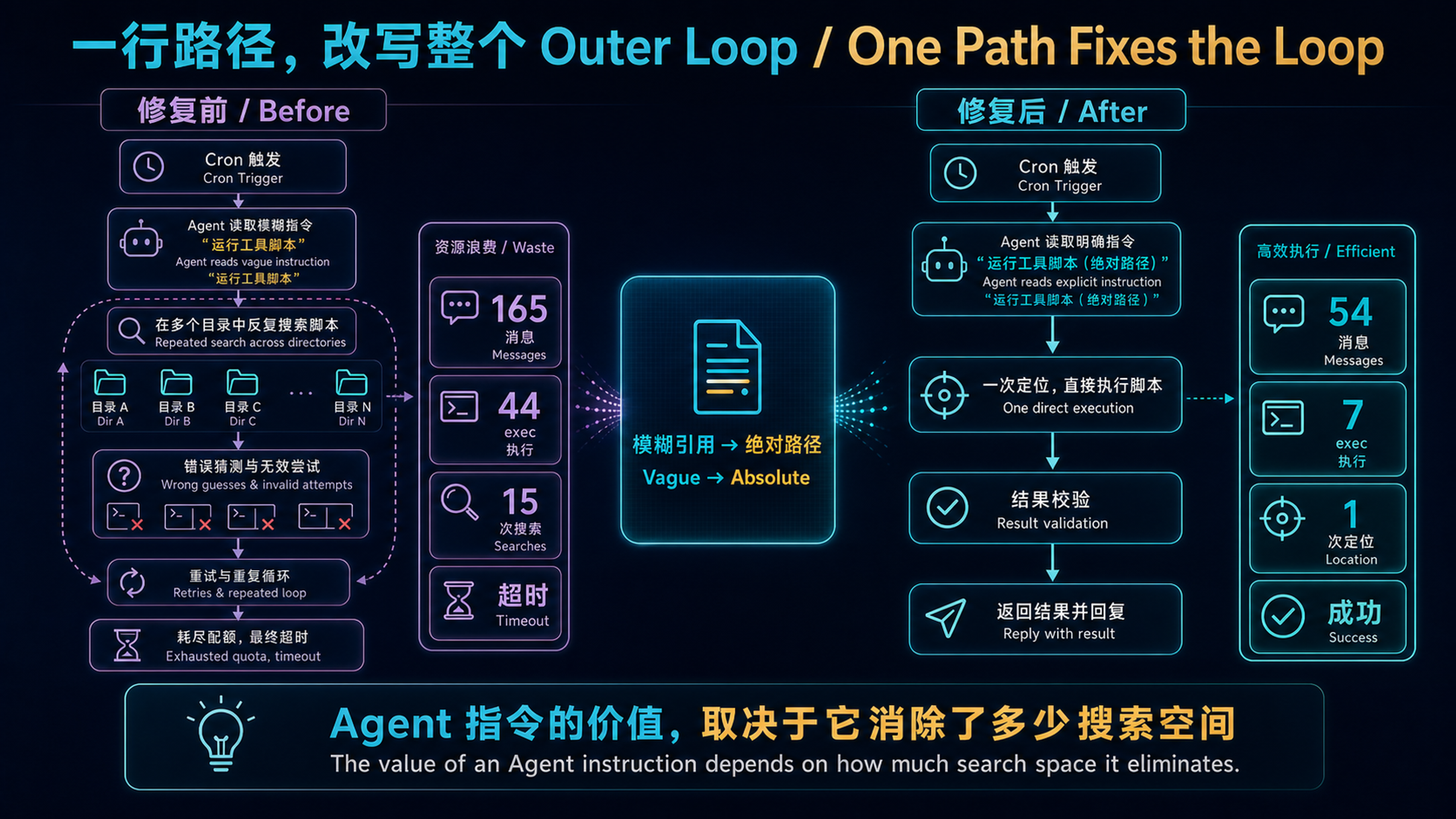
The before/after diagram establishes the complete causal chain. The model was not “stupid”; a vague instruction forced it to explore directories repeatedly. One absolute path collapsed the action space, reducing messages, searches, and execution calls at the same time.
Symptom: Cron Job Keeps Timing Out#
OpenClaw runs a cron job at 21:05 daily — daily-ai-news — which scrapes AI news, generates a summary, creates a banner image, and posts to a Lark (Feishu) group chat.
One day I noticed this job failing repeatedly. The logs showed:
Twenty-minute timeout. 2.8 million input tokens consumed. For a daily newsletter task.
Debugging: Reconstructing Agent Behavior from Logs#
OpenClaw’s cron executions produce full conversation logs. I pulled the most recent failure and counted the key metrics:
| Metric | Failed Run |
|---|---|
| Total messages | 165 |
| exec tool calls | 44 |
| tool_result total size | 1,122 KB |
| Runtime | 1200s+ (timeout) |
165 messages? 44 exec calls? A “scrape news → write summary → generate image → post to chat” pipeline shouldn’t exceed 60 messages and 10 tool calls under normal conditions.
Scrolling through the log line by line, I found the culprit.
Root Cause: The Agent Didn’t Know Where Its Tool Was#
The daily-ai-news SKILL.md (the skill’s instruction file) contained this line:
| |
That’s it. No path, no invocation syntax, no parameters.
The Agent understood it needed to call create-img, but had no idea where it lived. So it started searching:
| |
15 exec calls, just to locate a tool and figure out how to call it.
Worse, these search operations produced massive tool_result payloads — every find, grep, and ls output got stuffed into the conversation context. 44 exec calls accumulated 1.1MB of tool results, blowing up the context window, triggering compaction, and further slowing execution.
The Vicious Cycle#
This is a textbook context bloat feedback loop:
| |
That’s right — compaction discarded exactly the tool path the Agent had painstakingly discovered, so the next round started the search from scratch. This is where 165 messages came from: the Agent went through 2-3 complete cycles of “search → find → get compacted → search again.”
The Fix: One Absolute Path#
The fix was absurdly simple. Append this to the ai-news-digest SKILL.md, telling the Agent exactly how to invoke the tool:
create-img invocation (use directly, do not search)
- Read the skill spec first:
/home/openclaw/.openclaw/plugin-skills/create-img/SKILL.md- Run the script (command below)
- After generation, upload to Lark with
lark-cli im images create --file <image_path>to get theimage_key
| |
That’s it. Give the Agent a complete, copy-pasteable command including:
- Absolute path to the Python interpreter (in the virtual environment)
- Absolute path to the script
- All required parameters
- Output directory
Results#
First run after the fix:
| Metric | Before | After | Change |
|---|---|---|---|
| Total messages | 165 | 54 | -67% |
| exec tool calls | 44 | 7 | -84% |
| tool_result size | 1,122 KB | 204 KB | -82% |
| Runtime | 1200s+ (timeout) | 317s | From timeout to 5 minutes |
Messages cut by two-thirds, exec calls cut by 84%, tool result volume cut by 82%.
One file path beat any algorithm optimization.
Why This Bug Was So Hard to Spot#
This bug had three characteristics that made it elusive:
1. It Didn’t Fail Every Time#
If the Agent found the tool path on its first search round and didn’t trigger compaction, the task completed — just slower. The timeout loop only kicked in when context happened to cross the compaction threshold during the search phase. This made it a probabilistic timeout, not a deterministic failure, and debugging instincts naturally drifted toward “maybe the upstream API is slow.”
2. The Agent’s Search Behavior Looked Reasonable#
Reading the logs, every single action was individually reasonable: didn’t know the path → searched the filesystem → read files to confirm → checked the environment. This is a “smart but inefficient” behavior pattern. You wouldn’t think the Agent did anything wrong — just that it was strangely slow.
3. Vague References in SKILL.md Don’t Error#
Writing use create-img to generate images is perfectly valid syntax — SKILL.md has no type checking, no “unresolved reference” warning. The Agent won’t say “I can’t find create-img” and stop — it will go find it itself. This silent degradation into search mode is the hardest category of problems to catch.
Deeper Lesson: Principles for Writing AI Agent Instructions#
This bug made me realize something fundamental: the precision required for AI Agent instructions is far higher than for human documentation.
For Humans vs. For Agents#
When writing docs for humans, you can write “use create-img to generate images” — a human developer will ask a colleague, search the wiki, browse the directory tree. These exploration actions cost essentially nothing (no tokens, no context consumption).
When writing instructions for an Agent, the same vague reference triggers exploration actions where every step has a cost:
- Each
find/grepconsumes one tool call - Each tool result occupies context space
- Context bloat triggers compaction
- Compaction may discard previously found information
An Agent’s “curiosity” has a price, measured in context space.
SKILL.md Writing Rules#
Based on this incident, I set rules for SKILL.md authoring:
1. All external tool references must include absolute paths. Not “use create-img” but /home/openclaw/.openclaw/plugin-skills/create-img/scripts/omniroute_image_batch.py. Five extra lines in SKILL.md beats 15 exec calls at runtime.
2. Executable commands must be directly copy-pasteable. Include interpreter paths, virtual environment activation, all parameters. The Agent should be able to paste the command straight into exec without any path resolution.
3. Explicitly write “do not search.” Alongside the full path, tell the Agent “use the following paths directly, do not search the filesystem.” This seems redundant, but Agents sometimes “verify” paths you give them — one “do not search” line saves that verification step.
4. Hard-code environment dependencies. Python virtual environment paths, Node.js versions, config files that need sourcing — all hard-coded. Don’t assume the Agent knows the runtime environment.
An Analogy#
This is like the difference between writing a README and writing a Dockerfile:
- README (for humans): “Install Python 3.14, then pip install -r requirements.txt in a virtual environment”
- Dockerfile (for machines):
RUN /usr/local/bin/python3.14 -m venv /app/.venv && /app/.venv/bin/pip install -r /app/requirements.txt
SKILL.md is an instruction set for Agent execution, not documentation for human reading. Its precision requirements are closer to a Dockerfile than a README.
The Bigger Picture: Where Outer Loop Performance Bottlenecks Live#
Looking back at the three posts in this series, a clear pattern emerges:
| Problem | Root Cause | Fix |
|---|---|---|
| Compaction silently swallows replies | Harness compression strategy doesn’t protect critical info | Add safety margin + structured prompt |
| Vector search broken unnoticed | Missing config causes silent degradation | Add embedding provider config |
| Cron job timeout | SKILL.md missing path causes search bloat | Add one absolute path |
The common thread: none of these were model capability problems. All were Outer Loop configuration/instruction precision issues.
This validates the core thesis from the first post: in the harness era, system quality bottlenecks are never in model inference — they’re in everything outside the model — context management, tool call specifications, instruction precision, degradation paths, monitoring and alerting.
One file path eliminated 84% of tool calls. One embedding provider config revived vector search. One safety margin parameter prevented compaction from swallowing replies. None of these fixes required a stronger model — they required better harness maintenance.
When your Agent underperforms, don’t reach for a model upgrade first. Open the logs, count the tool calls, watch how context grows. The answer is probably in one line of your SKILL.md.
This is the third post in the OpenClaw Production Notes series. If you’re also running AI Agent cron jobs, I hope the “one file path” lesson saves you some debugging time. The series will continue — the next topic might be tool call cost control and context budget management for Agents.