RAG vs LLM Wiki vs Plain Text — A Decision Framework for Agent Long-Term Memory
Every Agent builder hits this question eventually: where do I store user data so the agent remembers it next session?
Contents
Three approaches dominate the landscape: RAG (vector retrieval), LLM Wiki (structured knowledge injection), and plain-text context memory (the CLAUDE.md / Cursor Rules pattern). Each has vocal advocates. But picking wrong is expensive — do RAG too light and it’s a noise generator; do plain text too heavy and it’s a token incinerator.
Here’s a decision framework you can use today.
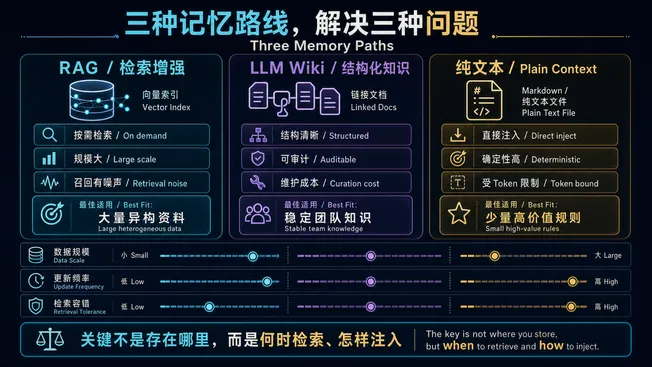
Start with the system boundaries. The important distinction is not the database brand; it is when retrieval happens, how much content enters context, and who owns writing and maintenance.
What Each Approach Actually Is
| Approach | Core Mechanism | Examples |
|---|---|---|
| RAG | Vector retrieval → top-k chunks → inject into prompt | Mem0, Zep, LangChain RAG, Cursor Codebase Index |
| LLM Wiki | Structured docs → full or on-demand injection into system prompt | Claude Projects, GPTs Knowledge, Notion AI |
| Plain Text | Markdown/text files → directly concatenated into system prompt | CLAUDE.md, Cursor Rules, AGENTS.md, Devin Knowledge |
The key difference isn’t where data is stored — it’s how it’s retrieved and when it’s injected.
Decision Matrix
| Dimension | RAG | LLM Wiki | Plain Text |
|---|---|---|---|
| Data volume | Large (>100 docs) | Medium (10–100 docs) | Small (<10 files, <200 lines) |
| Update frequency | High, real-time or near-real-time | Medium, weekly/daily | Low, project-level conventions |
| Retrieval need | Semantic matching (“find the most relevant paragraph”) | Structural navigation (“see chapter 3, section 4”) | None, full-load |
| Latency | +50–500ms (embed + retrieve + rerank) | 0 (preloaded) or +100ms (on-demand fetch) | 0 (fully in prompt) |
| Token cost | Low (only relevant chunks injected) | Medium (per-chapter injection) | High (entire file every call) |
| Maintainability | Low (chunk strategy, embedding model, retrieval params) | Medium (document structure needs upkeep) | High (it’s Markdown — edit and commit) |
| Explainability | Low (“why was this chunk retrieved?”) | High (“because you asked about chapter 3”) | Highest (everything is visible) |
| Hallucination risk | High (retrieval noise → bad context → hallucination) | Low | Low |
| Best for | Support KBs, codebase search, large-scale doc QA | Project docs, product manuals, compliance KBs | Coding conventions, project rules, personal preferences |
When to Use RAG
RAG is not a silver bullet. Only reach for RAG when your data genuinely exceeds prompt capacity. If you have 20 documents, shoving them all into the prompt beats RAG every time — the cost of retrieval noise far exceeds the token savings.
RAG makes sense when:
- You have >100 documents and users only care about 1–3 per query
- You need semantic matching, not keyword matching
- Your data updates in real time (e.g., connected to a live database)
- You can tolerate occasional irrelevant retrievals
Common RAG failure modes:
- Building a vector DB for 10 documents — retrieval noise > signal gain
- Arbitrary chunk sizes — too small loses context, too large kills precision
- Skipping reranking — irrelevant chunks in top-k poison the model
- Mismatched embedding and generation models — semantic space misalignment
Rule of thumb: first, try to fit everything relevant into the prompt. Only go RAG when it genuinely won’t fit. This order matters — RAG is a last resort, not a default.
When to Use LLM Wiki
An LLM Wiki is structured documentation that the model can reference on-demand or in full. Unlike RAG, it doesn’t rely on vector similarity. Unlike plain text, it isn’t dumped wholesale — it’s a “table of contents” with actual content behind it.
LLM Wiki fits when:
- Your knowledge has clear hierarchical structure (API docs, product manuals, compliance rules)
- Users need to “flip to a section” rather than “search for a snippet”
- You need human review and version control (critical for compliance)
Claude Projects’ Project Knowledge and GPTs’ Knowledge feature are canonical LLM Wiki implementations.
LLM Wiki vs RAG — the essential difference:
RAG says “I think these chunks match your question.” LLM Wiki says “Here’s the table of contents. Which chapter do you need?” The former relies on semantic similarity; the latter on structural navigation. The former can guess wrong; the latter can’t — but it requires the user or Agent to know which chapter to open.
When to Use Plain Text Context Memory
This is the CLAUDE.md / Cursor Rules / AGENTS.md pattern. One Markdown file, injected in full into the system prompt every call. It sounds primitive. In the right context, it’s optimal.
Why the “dumb” approach often wins:
- Auditable — every change is a
git diff - Version-controlled — memory has git history; you can roll back to Tuesday
- Zero latency — no embedding, no retrieval, straight concatenation
- Zero noise — every word you wrote is in the prompt; no “wrong chunk retrieved”
- Harder to prompt-inject — content is human-written, not AI-auto-generated
Cursor 1.2 adding mandatory user approval for Memories, and Devin defaulting to suggestion-only — these are post-prompt-injection design consensus. Plain text memory doesn’t require “trusting what the AI remembered” because every line was written by a human.
Plain text shines for:
- Project-level conventions (“We use Java 17, Spring Boot 3.x”)
- Coding standards (“No Lombok, use records”)
- Personal preferences (“Answer in Chinese, code comments in English”)
- Agent behavior constraints (“Confirm before invoking tools”)
Plain text fails when:
- Data exceeds ~200 lines — eats too much context window
- Knowledge needs frequent updates — every change requires manual file edits
- Knowledge is shared across projects — copy-paste leads to divergence
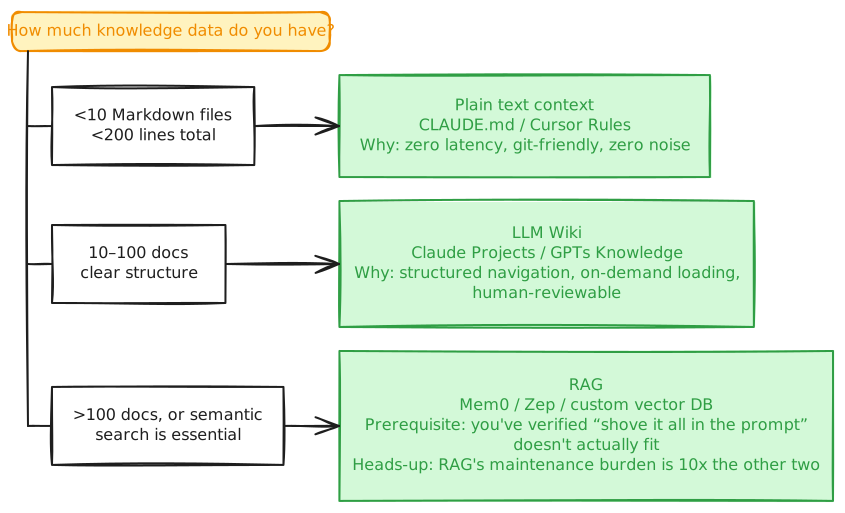
The Decision Tree
View source (Mermaid)
mermaid10 lines of code
flowchart LR
    %% layout: tree
    Q(["How much knowledge data do you have?"])
    Q --> A["<10 Markdown files<br><200 lines total"] --> A1["Plain text context<br>CLAUDE.md / Cursor Rules<br>Why: zero latency, git-friendly, zero noise"]
    Q --> B["10–100 docs<br>clear structure"] --> B1["LLM Wiki<br>Claude Projects / GPTs Knowledge<br>Why: structured navigation, on-demand loading,<br>human-reviewable"]
    Q --> C[">100 docs, or semantic<br>search is essential"] --> C1["RAG<br>Mem0 / Zep / custom vector DB<br>Prerequisite: you've verified “shove it all in the prompt”<br>doesn't actually fit<br>Heads-up: RAG's maintenance burden is 10x the other two"]
    classDef q fill:#fff3bf,stroke:#f08c00
    classDef pick fill:#d3f9d8,stroke:#2f9e44
    class Q q
class A1,B1,C1 pickThe Mistake Everyone Makes
Many teams deploy all three simultaneously:
text3 lines of code
CLAUDE.md (plain text)
  + Vector DB RAG (dozens of docs)
+ Wiki knowledge base (product docs)Three systems injecting into the same prompt. The result:
- Token costs explode
- Contradictory information (plain text says Go, stale Wiki says Python)
- Debugging becomes “which chunk caused this answer?”
The fix: pick one as the primary memory layer. Use the others only when the primary one demonstrably falls short. For individual developers and teams under 10 people, plain text + an LLM Wiki is almost always enough. RAG is for when you scale past that.
Relationship to the LLM Memory Research
This article is the engineering companion to Why LLMs Have No Memory. That report covers the four-layer stack (Bare LLM → In-Architecture Memory → Long Context → Agent Memory Layer). This post focuses entirely on L4 Agent Memory Layer selection.
One more time for Karpathy’s analogy, because it’s too useful:
Weights = ROM (burned in at training, static) Context Window = RAM (directly addressable during inference) KV Cache = Working Memory (formed at test-time) External Storage = Disk (persistent but requires retrieval)
Your choice determines what your Agent’s “hard drive” looks like — a fast SSD (plain text), a mountable filesystem (LLM Wiki), or a database with a search engine (RAG).
Summary
| If you have… | Choose |
|---|---|
| Small data, low change frequency, need auditability | Plain Text Context |
| Structured knowledge, need chapter-level referencing | LLM Wiki |
| Large data, need semantic search, can tolerate retrieval noise | RAG |
No silver bullets. But one iron rule: avoid RAG until you actually need it — and when you do, you’ll know.