
Background: The Cost Problem in Agent Tool Calling#
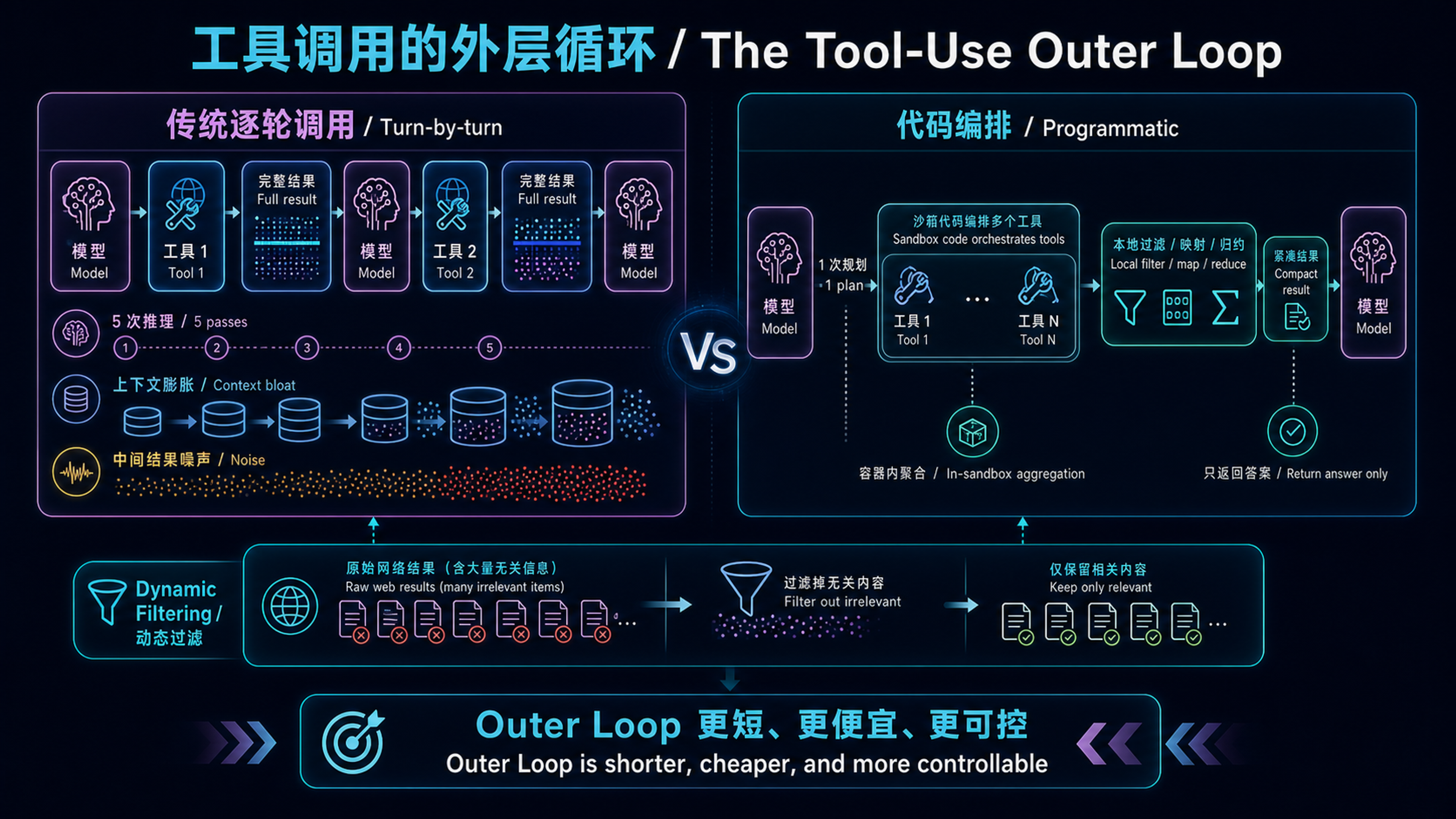
In traditional agent tool-calling, every tool invocation requires a full cycle of “model inference → tool execution → result return → model re-inference.” This seemingly natural loop breaks down at scale in three ways:
- Context Pollution: Every tool result is injected verbatim into the context window. Fetch expense reports for 20 employees, and 2,000+ line items enter context — even though you only need to know “which 3 people exceeded their budget.”
- Inference Overhead: Each tool call demands a full model inference pass. Five tools = five inference passes, each costing hundreds of milliseconds to seconds.
- Noise Degrades Accuracy: When the context window is packed with intermediate results, the model must find signal in noise. Context Rot research shows LLM performance on complex tasks drops 50-70% as context grows.
As Florian Bruniaux puts it in the Claude Code Architecture Guide: “The Outer Loop — everything outside the model: context management, tool invocation, verification, memory consolidation — increasingly determines system quality more than model inference itself.”
Anthropic’s suite of tool-use enhancements, released between November 2025 and February 2026, are fundamentally about solving Outer Loop efficiency. Among them, Programmatic Tool Calling (PTC) and Dynamic Filtering represent the deepest paradigm shift.
The diagram below establishes the article’s cost model. The left side repeatedly invokes the model and injects full tool results. The right side keeps orchestration, filtering, and aggregation inside the sandbox and returns only the compact answer. The benchmark and deployment discussions later in the article map back to this path difference.
Programmatic Tool Calling: Code-Driven Orchestration#
The Core Paradigm Shift#
Michael Ridland, writing on the Team 400 blog, pinpoints the traditional bottleneck:
“Every time an agent needs to call a tool — query a database, check an API, read a file — it has to do a full round trip back to the model. The model generates a tool call, your code executes it, the result goes back to the model, the model processes it, and maybe generates another tool call. Repeat.”
PTC’s paradigm shift: Instead of Claude requesting tools one at a time and having results return to its context, Claude writes Python code that orchestrates all tool calls internally. Only the final stdout enters the context window.
| |
The concept is simple, but its implications are profound — it moves orchestration logic from the model’s “reasoning chain” into a “code execution environment.” Loops, conditionals, data transformations, and error handling all become explicit code rather than implicit model reasoning. Masaki Hirokawa of Claude Lab, in his production guide, summarizes:
“Claude excels at writing code. By letting it express orchestration logic in Python rather than through natural language tool invocations, you get more reliable, precise control flow.”
How It Works: Container-Based Orchestration#
PTC relies on the Code Execution tool (sandboxed container) to run:
- Mark tools as callable: Use the
allowed_callersfield to specify which tools can be invoked from code - Claude generates orchestration code: Claude writes a Python script containing multi-step tool calls, data processing, and control flow
- Container executes and pauses: When code calls a tool, the container pauses and the API returns a
tool_useblock - You provide tool results: Results go back to the code (not the model context), and execution continues
- Only final output reaches Claude: All intermediate results are filtered; Claude only sees the final
stdout
The critical field is allowed_callers, which has three possible values:
allowed_callers Value | Meaning |
|---|---|
Omitted / ["direct"] | Traditional calling only |
["code_execution_20260120"] | Callable from sandbox code only |
["direct", "code_execution_20260120"] | Both modes (not recommended — confuses Claude) |
Bruniaux’s architecture guide highlights an important safety note: allowed_callers is not a hard security boundary. It’s a strong guidance (Claude is trained to respect it), but your client should still be prepared to handle a direct tool_use for any tool it defines.
Container Lifecycle#
Containers have a 4.5-minute idle timeout and a 30-day maximum lifetime. Always check the expires_at field on every response. If the container expires, Claude treats the tool call as timed out and retries.
Real Performance Data#
Claude Lab provides detailed benchmark comparisons:
| |
Anthropic’s official data validates this:
- Average input token reduction of 37% on complex research tasks (43,588 → 27,297 tokens)
- BrowseComp accuracy jumped from 42% to 71% (PTC was the key unlock)
- On a 75-tool project-management agent benchmark, billed tokens dropped ~38% with no accuracy loss
Community analyst Shayan Tabe’s independent analysis confirms the ~37% overall token reduction, though this number has not been officially endorsed by Anthropic.
Production Patterns: Four PTC Programming Paradigms#
PTC’s real power lies in four concrete programming patterns, all achievable in a single inference pass:
1. Batch Processing#
| |
2. Early Termination#
3. Conditional Tool Selection#
4. Data Filtering#
Team 400’s Michael Ridland captures the key insight:
“If 20 database queries return 5,000 rows total but only 3 employees are over budget, the model only sees those 3 employees. That’s potentially a 100x reduction in tokens.”
When to Use PTC (and When Not To)#
The combined wisdom from Claude Lab and Anthropic’s docs yields a clear decision matrix:
Strong fit:
- Processing large datasets where you only need aggregates or summaries
- Multi-step workflows with 3+ dependent tool calls
- Filtering, sorting, or transforming results before Claude sees them
- Tasks where intermediate data shouldn’t influence Claude’s reasoning
- Parallel operations across many items (checking 50 endpoints)
Weak fit:
- Strictly sequential workflows where each step depends on Claude reasoning over the previous result
- A small number of tool calls with small responses
- Tools requiring immediate user feedback between calls
Anthropic’s internal evaluation on τ²-bench reveals PTC’s blind spot: in airline/retail/telecom domains where each turn makes only 1-2 sequential tool calls, PTC left scores unchanged and cost ~8% more. Sequential single-call workflows do not benefit.
Constraints and Pitfalls#
PTC is not a silver bullet. Key constraints to consider during architecture:
| Constraint | Detail |
|---|---|
| No ZDR support | Cannot be used where Zero Data Retention compliance is required |
| No MCP tools | Tools provided by MCP connectors cannot be called programmatically |
No strict: true | Structured outputs with strict: true are incompatible with PTC |
| No forced tool choice | Cannot use tool_choice to force programmatic calling of a specific tool |
| Container timeout | Slow tool execution may cause container timeout and retry loops |
| Debugging complexity | Logic lives in generated code — inspect code execution output to understand failures |
Michael Ridland specifically warns about debugging:
“When something goes wrong in a traditional tool-calling flow, you can trace each step. With PTC, the logic lives in generated code. You need to inspect the code execution output to understand what happened. Build in logging.”
Dynamic Filtering: Context Slimming for Web Search#
The Problem#
Web search is the most token-intensive task. The traditional flow: initiate query → get search results → fetch full HTML from multiple websites → reason over everything in context. But the context pulled in from search is often mostly irrelevant — navigation bars, ads, footers, recommendations…
Anthropic’s official blog post describes the solution:
“Claude’s web search and web fetch tools now automatically write and execute code to post-process query results. Instead of reasoning over full HTML files, Claude can dynamically filter the search results before loading them into context, keeping only what’s relevant and discarding the rest.”
How It Works#
Dynamic Filtering is essentially PTC principles applied natively to web search — let Claude write Python to pre-process search results:
Benchmark Results#
Anthropic evaluated Dynamic Filtering on two rigorous benchmarks:
BrowseComp Dataset:
| Model | Without Filtering | With Filtering | Improvement |
|---|---|---|---|
| Sonnet 4.6 | 33.3% | 46.6% | +13.3 pp |
| Opus 4.6 | 45.3% | 61.6% | +16.3 pp |
DeepSearchQA: Tests whether an agent can systematically plan and execute multi-step searches without missing answers.
| Model | Without Filtering | With Filtering | Improvement |
|---|---|---|---|
| Sonnet 4.6 (F1) | 52.6% | 59.4% | +6.8 pp |
| Opus 4.6 (F1) | 69.8% | 77.3% | +7.5 pp |
Overall, Dynamic Filtering improved accuracy by an average of 11% while using 24% fewer input tokens.
Poe by Quora’s internal team validated these findings:
“Opus 4.6 with dynamic filtering achieved the highest accuracy on our internal evals when tested against other frontier models.” — Gareth Jones, Product and Research Lead
“The model behaves like an actual researcher, writing Python to parse, filter, and cross-reference results rather than reasoning over raw HTML in context.”
Configuration#
| |
Note: With web_search_20260209 / web_fetch_20260209, Dynamic Filtering is enabled by default on Sonnet 4.6 and Opus 4.6. To disable it (e.g., for ZDR compliance), use "allowed_callers": ["direct"].
Important: The basic web_search_20250305 version qualifies for ZDR, but the Dynamic Filtering version does not by default because it relies on internal code execution.
The Trinity: PTC + Tool Search + Tool Use Examples#
Anthropic’s Advanced Tool Use is actually three complementary features:
| Feature | Problem Solved | When to Use |
|---|---|---|
| Tool Search Tool | Tool definitions bloating context | 50+ MCP tools |
| Programmatic Tool Calling | Intermediate results polluting context | 3+ step tool workflows |
| Tool Use Examples | Schema alone can’t express usage patterns | Complex nested parameter tools |
Bruniaux’s architecture guide offers clear prioritization:
“Address your biggest bottleneck first: context bloated by tool definitions? → Tool Search. Large intermediate results? → PTC. Parameter errors? → Tool Use Examples.”
Tool Search: On-Demand Discovery#
A real-world example: connecting 5 MCP servers (GitHub 35 tools + Slack 11 tools + Sentry 5 tools + Grafana 5 tools + Splunk 2 tools) requires preloading 58 tool definitions into context, consuming ~55K tokens. With Tool Search enabled, only ~500 tokens of search tool stay resident, and 3-5 matched tools (~3K tokens) load on demand. 85% token overhead eliminated.
Internal benchmarks:
- Opus 4 tool selection accuracy: 49% → 74%
- Opus 4.5: 79.5% → 88.1%
Tool Use Examples: Teaching Claude Your Tool Conventions#
JSON Schema defines structure, but not: when to include optional parameters, which combinations make sense, or what conventions your API expects.
| |
Three examples teach Claude:
- Dates use YYYY-MM-DD, user IDs follow USR-XXXXX, labels use kebab-case
- Critical bugs require full contact info + escalation; feature requests have reporter but no escalation; internal tasks need only title
Internal testing: complex parameter handling accuracy improved from 72% to 90%.
Architecture Decisions: When to Deploy, When to Bypass#
Understanding the Outer Loop#
Bruniaux’s architecture guide presents a core philosophy — “Less scaffolding, more model.” This is embodied in Claude Code:
“No intent classifier. No task router. No RAG pipeline. No DAG orchestrator. No planner/executor split. The model itself decides when to call tools, which tools to call, and when it’s done.”
PTC and Dynamic Filtering extend this philosophy — they don’t add new abstraction layers, they remove unnecessary ones: no need to pass intermediate results to the model and wait for it to “think” about the next step; just orchestrate directly in code.
Model Compatibility#
PTC requires code_execution_20260120, currently supported on:
- Claude Opus 4.5+
- Claude Sonnet 4.5+
- Claude Fable 5 / Mythos 5
Dynamic Filtering requires web_search_20260209, enabled by default on Opus 4.6 / Sonnet 4.6.
Deployment Checklist#
Team 400 provides a practical four-step adoption path:
- Enable the code execution tool in your API calls
- Add
allowed_callersto tools that should be callable from code - Test with prompts that require multiple tool invocations
- Compare latency, token usage, and output quality against your traditional approach
Bruniaux emphasizes one easy-to-miss pitfall: never set ["direct", "code_execution_20260120"] on the same tool. Pick one — this gives Claude clearer guidance on the optimal usage pattern.
Summary#
Programmatic Tool Calling and Dynamic Filtering represent a significant paradigm shift in Agent architecture: from “everything goes through model inference” to “code-driven orchestration + on-demand filtering.”
This isn’t a concept Anthropic invented from scratch — it’s the systematic productization of a principle validated repeatedly in practice: let the model do what it does best (reasoning and decision-making), and let code do what code does best (loops, filtering, parallel execution).
| Dimension | Traditional Tool Calling | PTC / Dynamic Filtering |
|---|---|---|
| Orchestration logic location | Model’s reasoning chain | Python code |
| Intermediate results | All enter context | Filtered in code, never hit context |
| Inference passes for N tools | N+1 | 1~2 |
| Token consumption | Linear growth with tool count | Major reduction (37%~80%) |
| Debugging approach | Step through each turn | Inspect code execution output logs |
| Best for | Simple lookups, human-in-the-loop decisions | Batch processing, data aggregation, multi-step research |
This article synthesizes the following sources (all human-authored, not AI-generated):
- Anthropic Engineering: Introducing advanced tool use (Official blog, Nov 2025)
- Claude Blog: Improved Web Search with Dynamic Filtering (Official blog, Feb 2026)
- Claude API Docs: Programmatic tool calling (Official documentation)
- How Claude Code Works: Architecture & Internals (Florian Bruniaux technical analysis, Feb 2026)
- Claude Lab: PTC Production Guide (Masaki Hirokawa, Mar 2026)
- Team 400: Why PTC Matters for AI Agent Performance (Michael Ridland, Mar 2026)